Current Sigma Pricing: Plans Breakdown And Is It Worth The Cost?
 Natan Cohen··24 min read

⚡Key Takeaways
- Sigma uses custom pricing rather than fixed subscription rates. Buyers must request a quote, while Vendr reports a median annual contract value of approximately $64,941.
- Sigma offers four license tiers: View, Act, Analyze, and Build. Each supports different user permissions, which can influence licensing costs.
- Sigma’s total cost goes beyond licensing. Usage credits, cloud warehouse compute, and embedded analytics requirements can affect overall spending.
- Sigma is well suited for organizations using modern cloud warehouses. Its spreadsheet-style interface lets business users analyze live data without relying entirely on SQL.
- Qrvey offers predictable licensing for multi-tenant SaaS. Its flat-rate model supports unlimited users, tenants, and dashboards, while Ultra adds a built-in data engine.
Sigma does not publish a public per-user rate card, which makes it difficult for buyers to estimate costs from headcount alone.
Pricing depends partly on which users need View, Act, Analyze, or Build access, while warehouse computation and certain usage-based activity can add another layer to the total cost.
This guide breaks down Sigma’s current license structure, real contract benchmarks, warehouse and usage costs, how pricing compares with Tableau and Looker, what customers say about value, and whether the overall model is worth the cost.
How Much Does Sigma Cost?
Sigma doesn’t publish list prices for its current View, Act, Analyze, and Build licenses, so organizations need a custom quote based on their license mix and contract requirements. Sigma’s official documentation directs buyers to contact an Account Executive or Customer Success Manager for pricing.
Although Sigma doesn’t disclose fixed subscription rates, third-party procurement platforms such as Vendr and SpendHound provide benchmarks based on actual customer contracts.
Here’s what organizations reportedly pay for Sigma in 2026:
| Source | Pricing benchmark | What it represents |
|---|---|---|
| Sigma | No public list price | Contact sales for current license pricing |
| Vendr | $64,941/year median | Based on 154 purchases, with observed annual costs ranging from approximately $15,585 to $145,339 |
| SpendHound | $59,885/year SMB average | Average annual contract value for businesses with 50–1,000 employees |
| SpendHound | $82,046/year enterprise average | Average annual contract value for businesses with more than 1,000 employees |
Important: These figures are third-party contract benchmarks, not official Sigma list prices. Your actual quote may differ substantially depending on the combination of licenses, number of users, embedded analytics requirements, contract terms, and deployment needs.
For SaaS companies evaluating customer-facing analytics, the quoted platform subscription is only one consideration. Teams should also estimate the cost of expanding analytics access across customers and the cloud warehouse resources required to support growing workloads.
Qrvey: An Alternative

Sigma uses custom pricing, with total costs influenced by license mix, applicable usage credits, and cloud data warehouse compute. Qrvey also provides custom quotes but uses flat-rate licensing designed for multi-tenant SaaS, with unlimited users, tenants, and dashboards under a single platform fee.
This means SaaS companies can expand analytics access across more customers without incurring additional per-user or per-tenant licensing fees.
Qrvey offers two editions: Pro, for teams with an analytics-ready database, and Ultra, which adds a built-in data engine and transformation layer.
For businesses expecting substantial growth in customer-facing analytics adoption, Qrvey’s licensing model offers an alternative worth comparing when cost predictability is a priority.
Sigma Pricing Plans: A Breakdown
Sigma uses four license tiers: View, Act, Analyze, and Build, each designed for different levels of interaction with data. Unlike traditional feature-based subscription plans, Sigma assigns licenses according to the permissions granted to each account type.
Here’s how the four tiers work:
| License tier | What it includes |
|---|---|
| View | Access dashboards, reports, filters, and predefined drill paths to explore existing analytics. |
| Act | Submit forms, edit input tables, create alerts, and trigger more advanced actions. |
| Analyze | Perform deeper ad hoc data exploration and AI-assisted analysis without building workbooks. |
| Build | Create and edit workbooks, data models, applications, and workflows, with advanced data management capabilities. |
Sigma automatically assigns the appropriate billing license tier based on the highest-level permission enabled for an account type. This means granting additional capabilities can change the license tier required, potentially affecting subscription costs.
Sigma doesn’t publish fixed prices for these four tiers, so buyers must request a quote based on their expected license mix.
Feature 1: Real-Time Collaboration
Sigma supports collaboration across its four license tiers, although the level of interaction depends on each user’s assigned permissions.
For example, View users can access shared workbooks, interact with prepared reports, and add comments. Act users can contribute information through input tables, create alerts, and perform more advanced actions.
Users with Analyze licenses can explore data independently, while Build users can create and modify workbooks, models, and workflows for other users.
From a pricing perspective, the distinction matters when deciding how many users need each level of access.
An organization with hundreds of dashboard viewers but only a small group of report creators may require a different license mix than one where most users need advanced editing capabilities.
Collaboration isn’t necessarily a separate paid add-on. However, expanding a user’s permissions can require a higher license tier, so buyers should confirm the costs associated with their expected user roles.
Feature 2: Embedded Analytics
Sigma supports embedding dashboards, reports, visualizations, and interactive analytics into customer-facing applications. Depending on the configuration and user permissions, businesses can also provide advanced exploration and workbook editing experiences.
For example, SaaS companies can create tiered customer experiences using Sigma’s account types:
- View: Provide customers with access to predefined dashboards and reports.
- Act: Allow customers to contribute data, manage alerts, and perform supported actions.
- Analyze: Offer deeper self-service data exploration.
- Build: Give advanced users the ability to create and modify analytics content.
Importantly, embedded users are excluded from Sigma’s standard internal and guest license-utilization counts. However, this doesn’t mean embedded analytics is free or that external users have no commercial impact.
Sigma identifies secure embedding as a premium capability, and the applicable commercial terms must be confirmed with its sales team.
The key consideration is how Sigma prices the required embedded functionality, customer access, and expected usage. Organizations should request a production quote rather than assuming a particular embedded rate or applying standard internal license pricing.
Feature 3: Advanced Security
Sigma provides security and governance capabilities across its analytics environment, including controls for data access, authentication, and user permissions.
Relevant capabilities include:
| Security feature | What it includes |
|---|---|
| Role-based access control | Control which data and functionality users can access through account types and granular permissions. |
| Warehouse permissions | Apply existing security policies from connected data platforms through supported authentication and role-management methods. |
| Row- and column-level security | Restrict access to specific records or sensitive data fields using Sigma’s security controls or supported underlying warehouse policies. |
| Single sign-on (SSO) | Integrate authentication with an organization’s identity provider through supported methods such as SAML. |
| Audit logs | Track user activity and security-related events for monitoring, troubleshooting, and governance. |
Sigma can enforce existing data-platform security rules through supported configurations, including OAuth and dynamically assigned warehouse roles. It also provides its own access controls for data models, documents, and embedded experiences.
However, these security capabilities shouldn’t be assigned to invented Core, Premium, or Enterprise feature packages.
Instead, organizations should confirm which governance requirements are supported under their proposed license mix, what configuration is necessary, and whether specific capabilities require additional contractual arrangements.
For SaaS companies handling customer data across multiple tenants, the goal is to understand the total cost of delivering secure analytics, not simply whether a vendor lists enterprise security among its features.
Security requirements become more complex when SaaS applications serve multiple customers. This video explains the risks, architectural considerations and security capabilities teams should evaluate when implementing multi-tenant analytics.
Sigma Hidden Costs
Sigma’s total cost can extend beyond its quoted subscription price. While the platform doesn’t publish standard license rates, several factors can influence what organizations ultimately spend, particularly as analytics usage grows.
Here are the main costs to consider:
- License mix: Sigma’s View, Act, Analyze, and Build licenses support different levels of user interaction. Granting additional permissions can move users into higher license tiers, potentially increasing subscription costs.
- Usage credits: Sigma’s usage-based model charges credits for certain activities, including published input table updates, integration actions, and report exports. Sigma Agent messages will also begin consuming credits from November 1, 2026, at 0.1 credit per message. These costs can increase as users interact with applications, automated workflows, and agentic analytics more frequently..
- Cloud warehouse compute: Sigma queries data directly from connected platforms such as Snowflake, BigQuery, and Databricks. Frequent queries, complex calculations, and growing data workloads can increase the underlying warehouse’s compute costs.
- Embedded analytics: Sigma supports secure embedding as a premium capability. SaaS companies should confirm the commercial terms for external customer access, required functionality, and expected usage rather than assuming embedding is included in their standard subscription.
- Implementation and contract terms: Custom integrations, onboarding, and specialized support may introduce additional costs depending on the services purchased. Buyers should also review renewal conditions, contractual commitments, and any negotiated price adjustments.
Ask Sigma to break down subscription, secure embedding, usage credits, implementation, and support costs separately. This helps you understand how the total cost could change as your application grows, rather than comparing subscription prices alone.
Sigma vs Tableau and Looker on Price
Comparing Sigma Computing vs. Tableau or Looker requires looking beyond subscription prices. Each platform uses a different licensing structure, which affects how costs grow as organizations add users, expand analytics access, and increase data consumption.
Here’s how their pricing models compare:
| Platform | Starting price | Pricing model | Best suited for |
|---|---|---|---|
| Sigma | Custom quote | View, Act, Analyze, and Build licenses, selected usage credits, and separate cloud warehouse compute costs | Organizations already using modern cloud data warehouses |
| Tableau | Standard from $15/user/month; Enterprise from $35/user/month, billed annually | Edition and role-based licensing, with capacity-based alternatives | Teams seeking publicly listed entry prices and predictable user-role requirements |
| Looker | Custom quote | Platform subscription plus user licensing, with additional conversational AI token charges beyond included allowances | Enterprises prioritizing centralized data modeling and governed analytics |
Sigma’s costs depend on license permissions and consumption. Higher interaction requirements can affect license allocation, while certain actions consume usage credits. Warehouse queries also incur costs through the connected data platform.
However, organizations already operating Snowflake, Databricks, or BigQuery may benefit from analyzing governed data directly without maintaining a separate analytics data layer.
Tableau offers greater visibility into starting prices, although its advertised $15 and $35 rates represent Viewer-level entry pricing. Creator and Explorer licenses cost more. Per-seat costs can increase with user growth, but Tableau also offers capacity-based Viewer access.
Looker includes monthly Conversational Analytics token allowances, with overage pricing defined for usage beyond those allocations. However, Google has extended its promotional period, so quota enforcement and overage billing are not currently active; customers will receive at least 90 days’ notice before enforcement begins
Ultimately, none is universally cheaper. Buyers should compare expected user growth, required permissions, AI consumption, and infrastructure costs before choosing a pricing model.
Sigma Pros & Cons
Sigma offers a spreadsheet-style analytics experience with direct access to cloud warehouse data, making it attractive to organizations that want business users to explore data without relying entirely on technical teams. However, its custom licensing and warehouse-dependent architecture introduce cost considerations worth evaluating.
Pros
- Familiar spreadsheet interface: Sigma uses a spreadsheet-style interface with familiar formulas, filters, and pivot tables, allowing business users to analyze data without extensive SQL knowledge.
- Direct cloud warehouse access: Sigma queries data directly from platforms such as Snowflake, Databricks, and BigQuery, helping organizations work with existing governed data without maintaining a separate analytics data layer.
- Flexible user permissions: View, Act, Analyze, and Build licenses accommodate different levels of user interaction, allowing organizations to assign capabilities based on individual responsibilities.
- Strong collaboration and writeback capabilities: Teams can collaborate on workbooks, edit input tables, submit data, and trigger actions that support operational workflows.
- Governed AI and agentic analytics: Sigma provides AI-assisted analysis and agents that work with governed warehouse data, helping users investigate information and automate supported actions within existing security controls.
- Internal and embedded analytics support: Organizations can use Sigma for employee-facing reporting or embed dashboards, self-service analytics, and interactive experiences into customer-facing applications.
Cons
- No publicly available license prices: Sigma doesn’t publish fixed rates for its View, Act, Analyze, and Build licenses, making it difficult to estimate subscription costs without contacting sales.
- Custom quotes require additional planning: Buyers must discuss their expected license mix, usage requirements, and contract terms with Sigma before determining their actual subscription costs.
- Warehouse costs affect total spending: Sigma relies on connected data platforms for query execution, so organizations must account for warehouse compute and other applicable data-platform expenses alongside Sigma licensing.
- Usage credits introduce cost variability: Certain activities, including input table updates, integration actions, report exports, and Sigma Agent messages, can consume billable credits depending on the workflow. Agent messages begin using credits from November 1, 2026, so organizations planning significant AI usage should include that activity when forecasting costs.
- Dependence on a modern cloud data platform: Sigma works particularly well for organizations with an established cloud warehouse. Teams without one may need additional infrastructure, data preparation, and ongoing management.
- Permission management requires attention: Different license tiers and custom account types give administrators flexibility, but granting higher-level permissions can change licensing requirements and complicate cost forecasting.

Who Is Sigma Best For?
Sigma is best suited for the following teams that want to analyze, explore, and act on data stored in modern cloud warehouses.
Persona 1: Spreadsheet Users and Operations Teams
Sigma is particularly useful for finance, operations, FP&A, revenue teams, and business analysts who are comfortable working with spreadsheets but need access to governed enterprise data.
Its familiar grid-style interface, formulas, and pivot tables allow users to manipulate data, perform calculations, and build reports without relying entirely on SQL or technical teams.
For organizations already using cloud data warehouses, Sigma provides a way to extend spreadsheet-like analysis to larger datasets while maintaining centralized data governance.
Persona 2: Data Analysts
Sigma suits data analysts working with established cloud warehouses such as Snowflake, Databricks, and BigQuery who want to analyze live data without moving it into a separate analytics engine.
Analysts can combine spreadsheet-based exploration with SQL and supported Python workflows to investigate data, prepare analyses, and build reusable reports.
They can also create governed datasets and workbooks for business users, reducing repetitive reporting requests while maintaining consistency across departments.
Persona 3: Business Leaders
Sigma is a good fit for business leaders whose organizations already have modern data infrastructure but want to make analytics more accessible to non-technical teams.
Instead of waiting for the central BI team to prepare every report, department leaders can explore live metrics, ask AI-assisted questions, and investigate performance changes independently.
Sigma’s collaboration, input tables, and action capabilities also allow teams to contribute information and support operational decisions directly within their analytics workflows.

Sigma Customer Reviews
Sigma has a 4.5/5 rating on G2 based on more than 600 customer reviews. Users frequently praise its spreadsheet-style interface, live warehouse connections, and writeback capabilities. However, some reviewers highlight challenges with cloud warehouse costs, large dataset performance, and data modeling.
Positive Customer Experiences
Alex B., Senior Data Analyst, praised Sigma’s live query capabilities, which allow his team to access real-time reports and act on updated information immediately. He also highlighted faster, more accurate collaboration across colleagues, helping improve the services and care provided to their members.

Vidhusha P., Enterprise Reviewer, appreciated Sigma’s ability to make Snowflake data accessible to users without SQL knowledge. She highlighted its interactive dashboards and input tables, which allow teams to explore data, update planning figures, and write information back to Snowflake without switching between tools.

Customer Complaints
Rishabh S., Analyst, reported slow performance and limited data visualization capabilities. He also found Sigma unsuitable for presentations and noted the lack of map visualizations as a drawback.

Randall H., Director of Customer Service, highlighted difficulties creating one-off reports, explaining that Sigma requires him to save new workbooks even for questions that don’t need ongoing tracking. He also found the platform too complex for regular business users to create their own data models and worksheets, leaving them dependent on data analysts for reporting requests.

Alternative to Sigma: Qrvey

Sigma is particularly strong for organizations that already run a modern cloud data warehouse and want business users to analyze and act on that live data.
Qrvey is purpose-built for customer-facing, multi-tenant SaaS analytics, offering a different approach to licensing, data architecture, security, and embedding.
For SaaS companies evaluating long-term analytics costs, here are four areas where Qrvey stands out.
1. Flat-Rate SaaS Licensing
Sigma uses custom licensing based on user permissions, with additional costs for applicable usage credits and cloud warehouse consumption. Although embedded users are excluded from Sigma’s standard internal license-utilization counts, commercial terms for customer-facing deployments must be negotiated separately.
Qrvey, on the other hand, uses flat-rate licensing with unlimited users, tenants, and dashboards, allowing SaaS companies to expand analytics access without additional per-user or per-tenant licensing fees.
This distinction becomes particularly relevant when SaaS products begin serving more customers. Global K9 Protection Group encountered scalability challenges and rising costs as the number of users on its former analytics platform increased.
After adopting Qrvey, the company delivered reports, heatmaps, and dashboards to more than 120 customers.
“With Qrvey, we’re spending 60% less compared to QuickBase,” said Herman Haynes, Chief Information Officer at Global K9 Protection Group.
It illustrates why SaaS companies should evaluate how analytics costs change as their customer base grows.
| Plan | Best for | What it includes |
|---|---|---|
| Qrvey Pro | SaaS teams with an analytics-ready database that want to move quickly and keep infrastructure light | Fast, cost-effective deployment of embedded dashboards, reporting, and automation without the overhead of a data engine |
| Qrvey Ultra | SaaS teams seeking maximum flexibility, scalability, and control in one platform | Built-in data engine and transformation layer for high-performance, multi-tenant analytics from any data source |
Beyond managing licensing costs, SaaS companies can also explore opportunities to generate revenue from embedded analytics. This video explains how businesses can monetize analytics capabilities within their existing products.
2. Flexible Data Architecture
Qrvey offers two architectural options:
- Qrvey Pro: Connects to an existing analytics-ready database, allowing teams to embed dashboards, reporting, and self-service analytics without deploying another data engine.
- Qrvey Ultra: Includes a built-in data engine and transformation layer to prepare, manage, and serve analytics data from different sources.
Consider a logistics SaaS platform whose customers check shipment statuses throughout the day but review historical delivery performance only once a week. Both sets of information are useful, but they don’t necessarily require the same data freshness or query approach.
With Qrvey Ultra, the product team could use live connections for current shipment information and managed datasets for periodically refreshed historical reports within the same dashboard.
This gives customers access to the information they need while allowing the SaaS provider to reduce unnecessary direct warehouse queries where the workload permits.
If the company already has an analytics-ready database and doesn’t need a separate managed data engine, Qrvey Pro may be a more suitable option. The decision depends on reporting frequency, data freshness requirements, and total infrastructure costs.
Qrvey also deploys within the customer’s AWS, Azure or GCP account, giving engineering teams direct control over their analytics infrastructure. Infrastructure and operating costs still need to be considered separately.

3. Native Multi-Tenant SaaS Architecture
Both Sigma and Qrvey support embedded analytics, access controls, and customer-facing use cases. However, Qrvey’s architecture is specifically designed for applications serving multiple customer tenants.

Qrvey supports row-, column-, and schema-level security, with tenant and user context passed through security tokens. Its access controls can align with the host application’s existing permission policies, helping SaaS teams maintain consistent data access across customers.

The platform also supports tenant-aware self-service analytics, allowing customers to create or customize dashboards within their permitted data access.
For additional self-service capabilities, Qrvey provides Sidekick and AI agents that help users explore governed data using natural language.
This approach helps SaaS companies deliver personalized analytics experiences across different customers without developing separate analytics systems for every tenant.
4. Native JavaScript Embedding
Sigma supports secure embedding through iframe-based integrations, including JWT authentication, customer access controls, and interactive analytics experiences.
Qrvey takes a different approach by using native JavaScript components instead of iframes to embed analytics directly into a SaaS application.
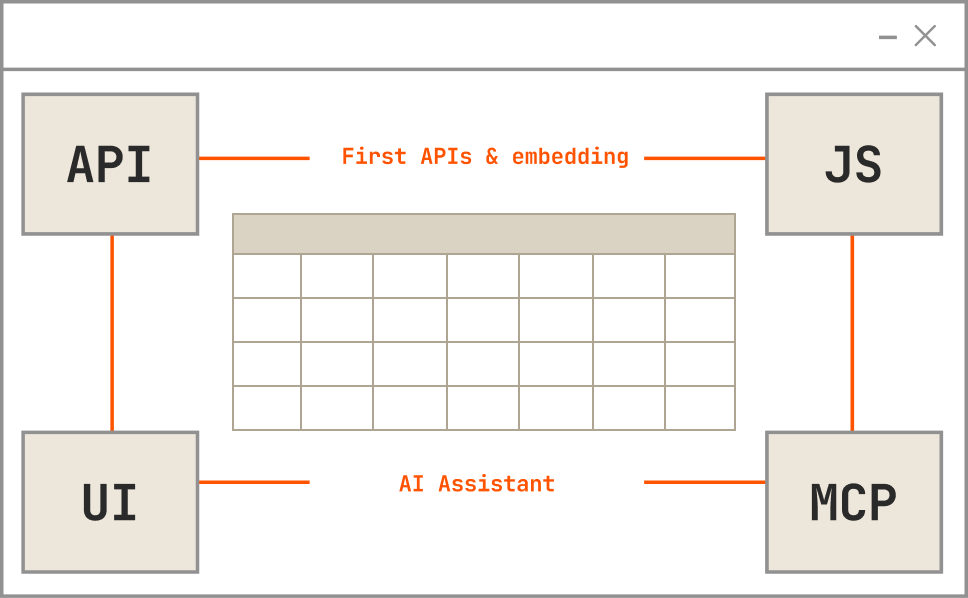
This gives development teams greater flexibility to integrate dashboards, visualizations, and self-service builders within their existing application interface.

Combined with tenant-aware security and customizable analytics experiences, Qrvey’s embedding approach is designed to help SaaS teams deliver analytics as part of their product rather than as a separate reporting destination.


Does Sigma Pricing Fit Your Budget?
Sigma can be a cost-effective option for organizations already using a cloud data warehouse and able to forecast their View, Act, Analyze, and Build license requirements. However, buyers should evaluate the subscription quote alongside usage credits and warehouse compute costs to understand their total investment.
For multi-tenant SaaS companies expecting analytics adoption to grow across customers, Qrvey offers a different approach with flat-rate licensing and no per-user or per-tenant fees.
Qrvey Ultra also provides a built-in data engine and transformation layer for teams seeking greater flexibility in their analytics architecture.
Explore Qrvey pricing to compare your options.
FAQs
They are useful as reference points, but they should not be treated as Sigma list prices. Contract benchmarks from procurement platforms reflect what other customers reportedly paid under different license mixes, requirements and negotiations. Your actual quote may be substantially different, so use benchmarks to establish a range before requesting pricing for your specific deployment.
Document how many users need each level of analytics access, which capabilities they require and whether analytics will be used internally or embedded for customers. SaaS teams should also estimate expected warehouse activity, embedded usage and any workflows that could consume usage credits so the quote reflects a realistic production scenario.
Test more than dashboard functionality. Track the queries generated against your warehouse, the user permissions required for realistic workflows and any activities that may consume credits. This helps you connect the technical proof of concept to the commercial model before committing to a production deployment.
No. Qrvey Pro can work with an existing analytics-ready database, while Qrvey Ultra adds a built-in data engine and transformation layer. This gives SaaS teams options based on how their data is already prepared and how much of the analytics data infrastructure they want Qrvey to provide.
Yes. Qrvey uses native JavaScript components rather than iframe-based embedding. Development teams can place dashboards, visualizations and self-service builders directly within their SaaS interface, giving them more control over how analytics fits into the surrounding product experience.
Natan brings over 20 years of experience helping product teams deliver high-performing embedded analytics experiences to their customers. Prior to Qrvey, he led the Client Technical Services and Support organizations at Logi Analytics, where he guided companies through complex analytics integrations. Today, Natan partners closely with Qrvey customers to evolve their analytics roadmaps, identifying enhancements that unlock new value and drive revenue growth.